▶ English · Tiếng Việt · 2:02 · Script: demo-video-series.en.md
In one sentence: If the kernel is pointed at a PostgreSQL role that would ignore row-level security (a superuser or a
BYPASSRLSrole), it refuses to start, before any migration runs, instead of quietly serving every tenant's data to every tenant.Read this if: you deploy or configure Astra and want to know which database role it must use and what happens if you get it wrong (developer angle) / you need to explain to an auditor how a configuration mistake is prevented from becoming a cross-tenant data leak (tech-lead angle).
The problem
Video 7 showed that Astra Express's two tenants, saigon-express and hanoi-express,
share one astra_doc table and are kept apart by PostgreSQL row-level security (RLS). RLS has one
well-documented exception: superusers and roles with the BYPASSRLS attribute ignore every policy.
That turns tenant isolation into a configuration question. In the Docker Compose stack the bootstrap role
astra is a superuser (it has to be, to create other roles) and the application role astra_app is not.
The two connection strings differ by four characters. If someone sets ASTRA_DB_USER=astra, perhaps to get
past a permission error during an incident, the kernel would work perfectly: every page loads, every test
that checks "can I read my data" passes. The only symptom is that Saigon's Customer list now also contains
Hanoi's customers. Nothing logs an error, because from PostgreSQL's point of view nothing is wrong.
Most systems treat this as a deployment checklist item. Frappe/ERPNext sidesteps it with a database per site, so there is no shared table to leak from; the equivalent mistake there is pointing a site at the wrong database. Astra's shared-table design needs a stronger answer than a checklist: the kernel checks the role itself and treats an unsafe role as a fatal error.
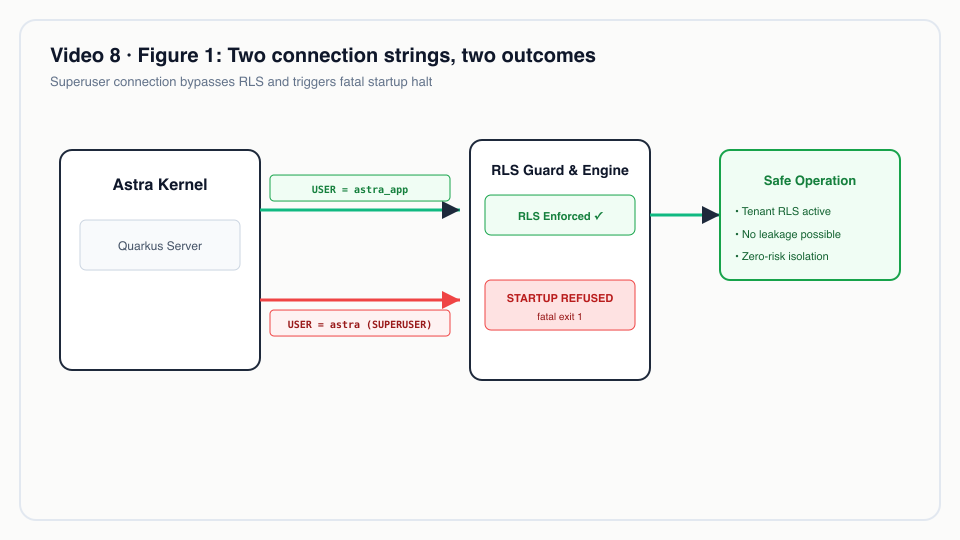 Two connection strings, two outcomes: a superuser connection fails closed before any schema runs; the application role succeeds under RLS.
What the video shows
| Scene | What you see | What it proves |
|---|---|---|
| 1 · Title | "Wrong config, and the kernel won't run." | Framing. |
| 2 · Risk | Role attributes in the Compose database: astra has rolsuper = t, rolbypassrls = t; astra_app has f, f. |
One wrong connection string is enough to disable isolation silently. |
| 3 · Attempt | A second kernel starts with ASTRA_DB_USER=astra. It prints Database role 'astra' is a SUPERUSER: row-level security would be ignored and tenants would see each other's data. and exits with code 1. |
The guard runs before Flyway: no migration runs and no DocType is loaded. |
| 4 · Guard | RowLevelSecurityGuard code. |
It reads rolsuper and rolbypassrls for current_user and throws. It is called twice: before Flyway migrates and at startup. |
| 5 · Role | deploy/docker/init/01-app-role.sql. |
The kernel's role is NOSUPERUSER NOBYPASSRLS NOCREATEDB NOCREATEROLE. FORCE ROW LEVEL SECURITY covers the table owner too. |
| 6 · Live | The running k3d cluster: kernel log line Tenant isolation guard: role 'astra_app' is subject to row-level security; connected roles astra_app (4 connections), astra_bms (2), astra_cdc (1), all with rolsuper = f and rolbypassrls = f. |
The production-shaped deployment uses only plain roles. |
| 7 · To be accurate | astra.tenancy.allow-rls-bypass, default false. |
When switched on, the kernel starts with a warning. For dev machines only. |
The full log of the refused start is in docs/video/v08-failclosed/assets/unsafe-kernel.log. The
important part of the stack trace is where the exception comes from:
Caused by: java.lang.IllegalStateException: Database role 'astra' is a SUPERUSER: row-level security would be ignored and tenants would see each other's data. Connect as a non-superuser application role (see deploy/docker/init/01-app-role.sql).
	at io.astra.doctype.store.RowLevelSecurityGuard.check(RowLevelSecurityGuard.java:58)
	at io.astra.doctype.store.RowLevelSecurityGuard_ClientProxy.check(Unknown Source)
	at io.astra.doctype.store.RowLevelSecurityFlywayCustomizer.customize(RowLevelSecurityFlywayCustomizer.java:20)
	at io.quarkus.flyway.runtime.FlywayCreator.createFlyway(FlywayCreator.java:155)
The guard fires while Quarkus is still creating the Flyway instance, which is before Flyway can migrate.
How it works

View source
flowchart TD
    A[Kernel process starts] --> B["Quarkus creates Flyway<br/>(migrate-at-start: true)"]
    B --> C["RowLevelSecurityFlywayCustomizer.customize()"]
    C --> D{"RowLevelSecurityGuard.check()<br/>rolsuper or rolbypassrls<br/>for current_user?"}
    D -- "no" --> E["Flyway migrates as astra_app<br/>(astra_app owns the tables)"]
    E --> F["StartupEvent: check() again"]
    F --> G["Log: role 'astra_app' is subject to<br/>row-level security; serve traffic"]
    D -- "yes, allow-rls-bypass=false (default)" --> X["IllegalStateException<br/>exit code 1, nothing migrated"]
    D -- "yes, allow-rls-bypass=true" --> W["WARN … NEVER use this in production<br/>continue"]
The check
astra-doctype/src/main/java/io/astra/doctype/store/RowLevelSecurityGuard.java
@ConfigProperty(name = "astra.tenancy.allow-rls-bypass", defaultValue = "false")
boolean allowBypass;

void onStart(@Observes StartupEvent ev) {
    check(dataSource);
}
// …
void check(DataSource dataSource) {
    try (Connection conn = dataSource.getConnection();
         Statement st = conn.createStatement();
         ResultSet rs = st.executeQuery(
                 "SELECT current_user, rolsuper, rolbypassrls FROM pg_roles WHERE rolname = current_user")) {
        if (!rs.next()) throw new IllegalStateException("cannot read role attributes for current_user");
        String role = rs.getString(1);
        boolean superuser = rs.getBoolean(2);
        boolean bypass = rs.getBoolean(3);
        if (superuser || bypass) {
            String msg = "Database role '" + role + "' is " + (superuser ? "a SUPERUSER" : "BYPASSRLS")
                    + ": row-level security would be ignored and tenants would see each other's data. "
                    + "Connect as a non-superuser application role (see deploy/docker/init/01-app-role.sql).";
            if (allowBypass) {
                LOG.warn(msg + " Continuing because astra.tenancy.allow-rls-bypass=true. NEVER use this in production.");
            } else {
                throw new IllegalStateException(msg);
            }
        } else {
            LOG.infof("Tenant isolation guard: role '%s' is subject to row-level security", role);
        }
    } catch (SQLException e) {
        throw new IllegalStateException("cannot verify row-level security role attributes", e);
    }
}
Design choices worth noting:
- It asks the database, not the configuration. The guard does not compare
ASTRA_DB_USERagainst a deny-list. It asks PostgreSQL what the connected role is. A role renamed to something innocent, or a plain role later grantedBYPASSRLS, is still caught. - Every failure path is closed. If the role row cannot be read, or the query itself fails, the guard throws too. "Could not verify" is treated the same as "unsafe".
- The escape hatch is explicit and loud.
astra.tenancy.allow-rls-bypassdefaults tofalse. Turning it on does not hide the problem; it changes the exception into a warning that says "NEVER use this in production" on every start. - The success path logs too. The
INFOline on a healthy start is evidence an operator or auditor can grep for, which is what scene 6 shows from the k3d cluster.
Why it runs before Flyway
astra-doctype/src/main/java/io/astra/doctype/store/RowLevelSecurityFlywayCustomizer.java
/**
 * Runs the tenant isolation guard before Flyway migrates the default datasource at start. Quarkus migrates
 * before {@code StartupEvent} observers run, so without this a kernel started as a superuser would apply the
 * migrations (and own the tables it creates) before refusing to start.
 */
@Singleton
public class RowLevelSecurityFlywayCustomizer implements FlywayConfigurationCustomizer {

    @Inject RowLevelSecurityGuard guard;

    @Override
    public void customize(FluentConfiguration configuration) {
        guard.check(configuration.getDataSource());
    }
}
Ordering matters because of ownership. The application role owns the tables Flyway creates, and the
migrations depend on that (see FORCE below). If a superuser ran the first migration, the superuser would
own astra_doc, and the kernel would refuse to start only after leaving the schema in the wrong hands.
An earlier version of the demo did exactly that: the video brief notes that the superuser had already
created the V3 to V5 tables before the guard stopped it. Hooking into Flyway's configuration step closes
that window. The second call at StartupEvent covers deployments that migrate separately and run the
kernel with migrations off.
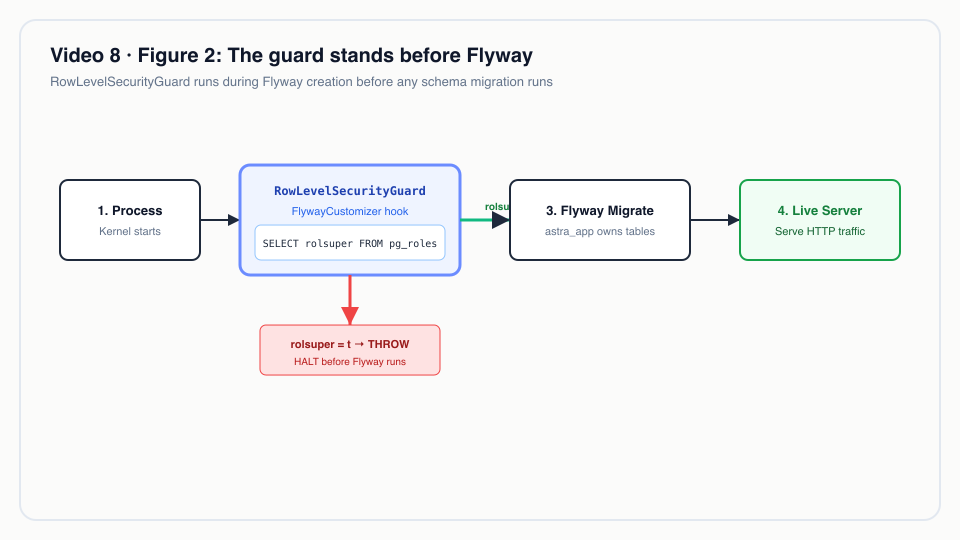 The startup guard runs before Flyway: it inspects role attributes from pg_roles and halts immediately if bypass privileges are detected.
The role the kernel is supposed to use
deploy/docker/init/01-app-role.sql
-- Runs once at database initialisation (docker-entrypoint-initdb.d), as the bootstrap superuser.
-- The kernel never connects as a superuser: superusers and BYPASSRLS roles ignore row-level
-- security, which would silently disable tenant isolation. The application role below owns the
-- schema objects Flyway creates; FORCE ROW LEVEL SECURITY keeps the owner subject to policies.
CREATE ROLE astra_app LOGIN PASSWORD 'astra_app' NOSUPERUSER NOBYPASSRLS NOCREATEDB NOCREATEROLE NOINHERIT;
GRANT CONNECT ON DATABASE astra TO astra_app;
GRANT USAGE, CREATE ON SCHEMA public TO astra_app;
The same statement is in the k3d manifest (deploy/k8s/base/postgres.yaml, ConfigMap postgres-init), and
the kernel's default username is astra_app (astra-server/src/main/resources/application.yml). The other
roles in the cluster are plain as well: astra_bms (Seata AT branches) is NOSUPERUSER NOBYPASSRLS, and
astra_cdc (deploy/db/20-cdc.sql) has REPLICATION to read the WAL but NOSUPERUSER NOBYPASSRLS.
Two layers, not one
astra-doctype/src/main/resources/db/migration/V1__astra_doc.sql
ALTER TABLE astra_doc ENABLE ROW LEVEL SECURITY;
ALTER TABLE astra_doc FORCE ROW LEVEL SECURITY;   -- applies to the table owner too
By default PostgreSQL does not apply RLS to a table's owner. Because astra_app owns the tables, ENABLE
alone would leave the kernel exempt from its own policies. FORCE removes that exemption. The guard and
FORCE cover different holes:
| Hole | Closed by |
|---|---|
The connected role is a superuser or has BYPASSRLS |
RowLevelSecurityGuard (refuses to start) |
| The connected role owns the table | FORCE ROW LEVEL SECURITY in every tenant-scoped migration |
| No tenant is bound in the transaction | The policy compares against current_setting('astra.tenant', true), which is NULL, so zero rows (Video 7) |
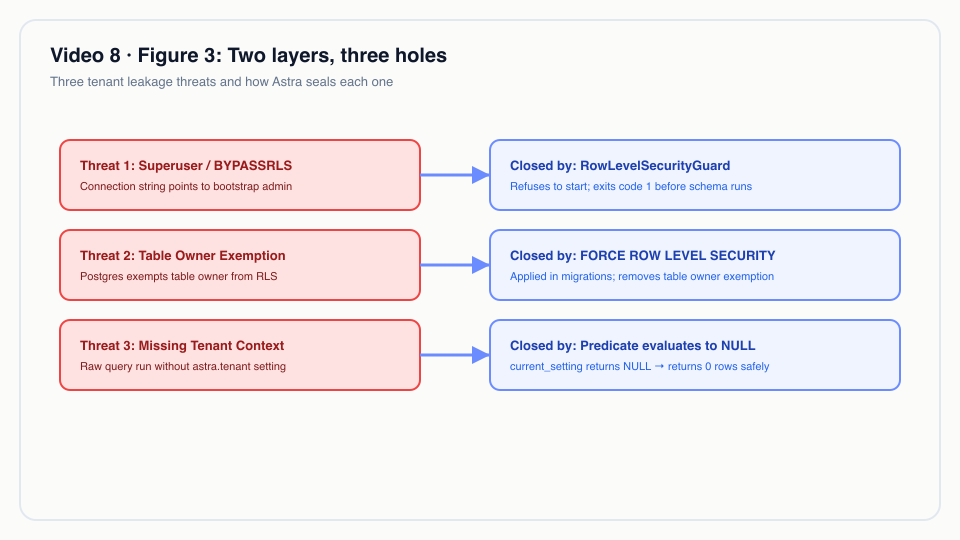 Two layers of defense: kernel-level tenant context and PostgreSQL row-level security. Superusers bypass both; the locked-down role is stopped by both.
Real-world example
Illustrative scenario: the company, people and values are made up; the mechanism and the rules it applies are the real ones shown above.
An accounting SaaS during a 2 a.m. incident. A provider runs Astra for 40 small companies' ledgers on
one Kubernetes cluster. After a database restore, the kernel fails with a permission error on one table.
The on-call engineer, under pressure, edits the astra-db Secret so that username is the bootstrap
superuser, and restarts the deployment.
Inputs:
- Secret
astra-db:usernamechanged fromastra_appto the superuser. - Deployment
astra-server: 2 replicas,RollingUpdatewithmaxUnavailable: 0andmaxSurge: 1,readinessProbeon/q/health/ready(deploy/k8s/base/astra-server.yaml).
What Astra does:
- The first new pod starts, Quarkus prepares Flyway, the customizer calls the guard, and the guard reads
rolsuper = tfor the connected role. - The guard throws
Database role '…' is a SUPERUSER: …; the process exits with code 1 before any migration and before any HTTP request is served. - The pod never reports ready. Because
maxUnavailableis 0, Kubernetes keeps the two old pods, which are still connected asastra_app, serving traffic. The rollout stalls instead of completing.
Outputs: no tenant ever sees another tenant's ledger, users keep working on the old pods, and the pod log states the cause and the fix in one line. The engineer fixes the actual permission problem (for example, a grant lost in the restore) instead.
The stalled rollout in step 3 is standard Kubernetes behaviour given the manifest's settings; the video demonstrates step 2 with a local process, not this exact rollout.
Without the guard, the same incident ends with a working system and a reportable data breach, discovered whenever a customer happens to notice someone else's invoices.
For technical leaders
- What it buys. It converts the most likely way to disable tenant isolation, a wrong connection
string, from a silent breach into a failed deployment. For an auditor, the control is code
(
RowLevelSecurityGuard), plus a log line on every healthy start, plus the role DDL. - What it costs. One query against
pg_rolesper start, twice. Operationally, the cost is that teams must keep a separate bootstrap role for administration and never reuse it for the application. - What it does not cover.
- A role that is not a superuser but owns the tables could in principle run
ALTER TABLE … NO FORCE ROW LEVEL SECURITYor drop a policy. Nothing in the kernel does that, and the guard does not detect it. Treat migrations as reviewed code. - The guard checks the default datasource only. The BMS datasource used for Seata AT
(
astra-tx-seata/src/main/resources/db/bms) has no RLS policies; its rows carry the tenant in the key. - Direct database access by people or other tools is outside the kernel's control. Give humans the same plain roles and audit superuser sessions.
- A role that is not a superuser but owns the tables could in principle run
- What to measure. Alert if the
Tenant isolation guard: role '…' is subject to row-level securityline is missing from a kernel start, and alert on anyallow-rls-bypass=truewarning outside dev. Periodically list connected roles withrolsuperorrolbypassrls; scene 6 shows the expected result for the cluster. - When the switch is acceptable.
astra.tenancy.allow-rls-bypass=trueexists for a developer's laptop where the only database user is a superuser. It should never appear in a shared environment's configuration; consider failing CI on it. - Compared with alternatives. Database-per-tenant designs (Frappe sites) are not exposed to this
specific risk but pay for it in operational overhead. Application-level
WHERE tenant_idfilters have no equivalent fail-closed check at all: a missing filter fails open.
Try it yourself
Prerequisites: JDK 25, Docker, jq, Bash 5, and an Astra kernel reachable at BASE (default
http://localhost:8080), because scripts/lib/demo-common.sh checks /api/iam/config before any scene
runs. The k3d stack (make k3d-up) satisfies this; the recording used it.
make infra-up && make build                  # Compose PostgreSQL (superuser astra, app role astra_app) + the kernel jar
make demo-express SCENES=8 PAUSE=0           # starts a throwaway kernel on :8099 as the superuser
Expected output (docs/video/v08-failclosed/assets/scene-08.log):
━━━ Scene 8 · The kernel refuses to run unsafely ━━━

▸ Start a second kernel connected as the PostgreSQL superuser (RLS would be ignored)…
$ ASTRA_DB_USER=astra java -jar astra-server/target/quarkus-app/quarkus-run.jar
Database role 'astra' is a SUPERUSER: row-level security would be ignored and tenants would see each other's data.

▸ …it refuses to start. Tenant isolation cannot be switched off by a misconfigured connection.
If the Compose stack is not running or the jar is missing, the scene prints
Needs the Docker Compose stack (make infra-up) and a build (make build) instead.
To see the healthy path on the k3d cluster, look for the guard's INFO line in a kernel pod's log:
kubectl -n astra logs deployment/astra-server | grep "Tenant isolation guard"Expected: Tenant isolation guard: role 'astra_app' is subject to row-level security.
To be accurate
- The switch
astra.tenancy.allow-rls-bypassexists and defaults tofalse. When it istrue, an unsafe role only produces a warning and the kernel starts. Dev machines only. - Do not read this as "the application role cannot disable RLS". As the table owner,
astra_appcould in theory change RLS settings on its own tables.FORCE ROW LEVEL SECURITYand the guard are two separate layers; neither prevents a deliberate DDL change by the owner. - The guard checks role attributes at startup. A role altered to
BYPASSRLSwhile the kernel is running is not detected until the next start. - Only the default datasource is checked. The BMS schema is not under RLS.
- No automated test in the repository exercises the guard; the evidence is the scene 8 run and the captured
logs in
docs/video/v08-failclosed/assets/.
Figures
- Figure 1 · Two connection strings, two outcomes
- Figure 2 · The guard stands before Flyway
- Figure 3 · Two layers, three holes
Related
- Previous: Video 7 · Multi-tenancy · Next: Video 9 · For developers
- Video 10 · Running on Kubernetes (the deployment the guard protects) · Video 16 · Rust CDC (the
astra_cdcreplication role) - Code walkthrough: demo-code-snippets.md, S4
- Source:
astra-doctype/src/main/java/io/astra/doctype/store/RowLevelSecurityGuard.java,astra-doctype/src/main/java/io/astra/doctype/store/RowLevelSecurityFlywayCustomizer.java,deploy/docker/init/01-app-role.sql,deploy/k8s/base/postgres.yaml,astra-doctype/src/main/resources/db/migration/V1__astra_doc.sql