▶ English · Tiếng Việt · 2:18 · Script: demo-video-series.en.md
In one sentence: a person signs in once with Keycloak, their roles come from signed Keycloak group paths
/tenants/<tenant>/<role>, and each DocType's YAML decides what those roles may read, create, write, submit and cancel, with maker/checker enforced by the kernel. Read this if: you need to know where anAccessDeniedExceptioncomes from and how to declare permissions for your own DocType (developer) / you are deciding how identity, tenancy and approval rules should be split between an IdP and the application (tech lead).
The problem
Astra Express runs two tenants, saigon-express and hanoi-express. In Saigon alone, five kinds of people touch
the same order: sales staff create and submit it, operations staff scan its waybill, customer care opens tickets
about it, and accountants cancel orders and pay collected COD (cash on delivery) out to shops. One person can
work for both tenants with different jobs in each.
The usual ways of handling this each leave a gap:
- Roles in the application database. Every app keeps its own user table and role table. Offboarding means remembering every app, and password handling lives in code that should not see passwords.
- Global roles in the IdP. "accountant" in the token says nothing about which company the person is an accountant for. Multi-tenant apps then trust a tenant header from the client, which is exactly what an attacker controls.
- Permission checks in controllers and UI. The UI hides a button, the API forgets the check, and a script calls the API directly.
- Approval rules in process documents. "The person who prepares a payout cannot approve it" is written in a policy PDF, not enforced anywhere.
Frappe/ERPNext puts role permissions on the DocType (with an "if owner" option), which is the right place; Astra keeps that idea. The difference is where identity lives: in Astra, users, passwords and role membership live in Keycloak, and the application only reads a signed token.
What the video shows
| Scene | What you see | What it proves |
|---|---|---|
| Login | Desk opens the Astra-themed Keycloak login page; tuan signs in |
Authorization Code with PKCE in the browser. The password is typed into Keycloak only; Astra receives an authorization code. |
| Token | Tuan belongs to the Keycloak group /tenants/saigon-express/sales |
Roles are Keycloak groups. The X-Astra-Tenant header only picks a tenant; the roles come from the signed token. |
/api/iam/me |
Tuan may read, create and submit orders, not cancel | Permissions are declared per DocType in YAML; Desk reads the effective result from /api/iam/me. |
| Desk | Tuan's draft order has Save and Submit; a submitted order has no Cancel; someone else's order cannot be saved, but sales can still submit it | Buttons follow permissions. if-owner limits write, not submit, exactly as the YAML says. |
| API, one order, four roles | Tuan (sales) cannot edit the waybill or cancel; Quang (ops) edits the waybill but cannot create orders; Ha (care) opens a ticket; Khoa (accountant) cancels | The kernel checks, so the API refuses the same things the UI hides. |
| Segregation of duties | Khoa's COD payment voucher of 350,000 VND: his own Submit is refused with 403; Thu, a second accountant, submits it and the ledger posts at once | Maker ≠ checker is a property of the DocType, enforced for Desk and API alike. |
The video ends with its "To be accurate" note: row-level conditions are still on the roadmap, and SAML and SCIM now run, in Video 21.
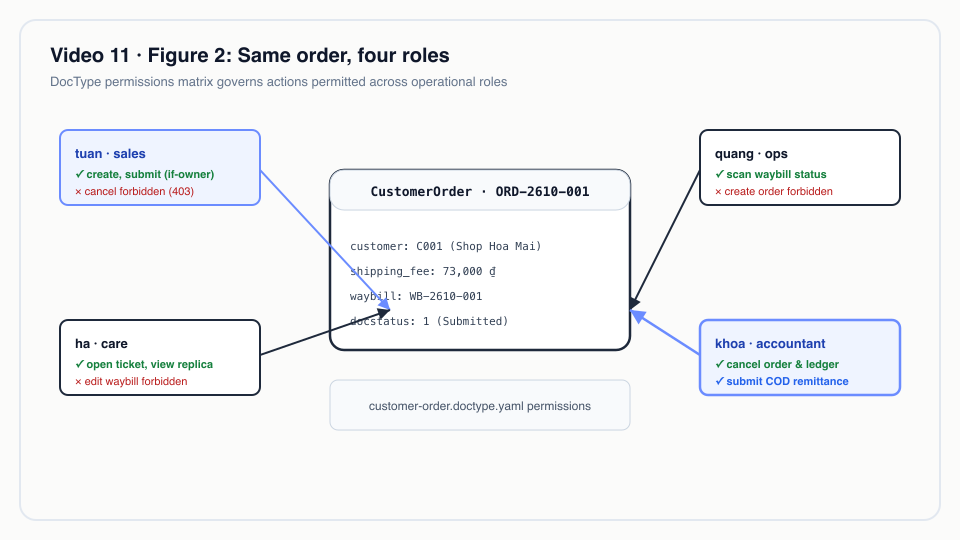 Same order, four roles: permissions declared on the DocType govern whether sales, ops, care, or admin can read, write, or submit.
How it works
The path of one request

View source
sequenceDiagram
    autonumber
    participant B as Desk (browser)
    participant K as Keycloak (realm astra)
    participant F as TenantResolverFilter
    participant R as DocResource
    participant P as DocPermissions
    B->>K: /auth?client_id=astra-desk&code_challenge=S256(verifier)
    K-->>B: redirect /desk/?code=…
    B->>K: POST /token (code + code_verifier)
    K-->>B: access token, groups: ["/tenants/saigon-express/sales"]
    B->>F: POST /api/doc/CODRemittance/…/submit<br/>Bearer token + X-Astra-Tenant: saigon-express
    F->>F: Memberships.of(identity) → roles in saigon-express
    alt no role in that tenant
        F-->>B: 403 not a member of tenant …
    end
    F->>R: tenantId, userId, roles
    R->>P: requireSubmit(doctype, roles, userId, existing)
    P-->>B: 403 when the rule denies or the submitter is the owner
1. Sign-in: the browser holds the code verifier, not Astra
Desk is a public OIDC client (astra-desk). It creates a random verifier, sends only its SHA-256 hash to
Keycloak, and later proves possession of the verifier when it exchanges the code. Astra's server never sees the
password, and a stolen authorization code is useless without the verifier kept in sessionStorage.
astra-server/src/main/resources/META-INF/resources/desk/desk.js
async function signIn() {
  const verifier = b64url(crypto.getRandomValues(new Uint8Array(32)));
  const challenge = b64url(await crypto.subtle.digest('SHA-256', new TextEncoder().encode(verifier)));
  const st = b64url(crypto.getRandomValues(new Uint8Array(16)));
  sessionStorage.setItem('astra-desk.pkce', JSON.stringify({ verifier, state: st, back: location.hash, tenant: state.tenant }));
  const q = new URLSearchParams({ client_id: state.config.deskClientId, redirect_uri: redirectUri(), response_type: 'code',
    scope: 'openid', code_challenge: challenge, code_challenge_method: 'S256', state: st, ui_locales: 'vi' });
  location.assign(oidc('auth') + '?' + q);
}
Why PKCE and not a server-side session: Desk is a static page served by the kernel, and the same flow serves the
mobile client (astra.iam.mobile.client-id in IdentityResource). One flow, no client secret in a browser or
an app bundle.
2. The server is a resource server that reads group paths
The kernel is configured as an OIDC service (it only verifies bearer tokens) and maps both the groups claim
and realm roles into identity roles.
astra-server/src/main/resources/application.yml
  # Resource server: every /api call carries a Keycloak access token (Authorization Code + PKCE on mobile).
  # Group paths /tenants/<tenant>/<role> and realm roles both become identity roles.
  oidc:
    auth-server-url: ${ASTRA_OIDC_URL:http://localhost:8180/auth/realms/astra}   # deploy/docker compose Keycloak
    client-id: astra-server
    application-type: service
    token:
      audience: astra-server
      principal-claim: sub
    roles:
      role-claim-path: groups,realm_access/roles
Memberships turns those paths back into a tenant → roles map. Roles are never global; "accountant" only means
something next to a tenant name.
astra-kernel/src/main/java/io/astra/kernel/security/Memberships.java
public record Memberships(Map<String, Set<String>> byTenant, boolean platformAdmin) {

    public static final String GROUP_PREFIX = "/tenants/";
    // …
    public static Memberships of(SecurityIdentity identity) {
        if (identity == null || identity.isAnonymous()) return new Memberships(Map.of(), false);
        Map<String, Set<String>> out = new TreeMap<>();
        for (String role : identity.getRoles()) {
            if (!role.startsWith(GROUP_PREFIX)) continue;
            String[] parts = role.substring(GROUP_PREFIX.length()).split("/");
            if (parts.length == 2 && !parts[0].isEmpty() && !parts[1].isEmpty()) {
                out.computeIfAbsent(parts[0], t -> new TreeSet<>()).add(parts[1]);
            }
        }
        // …
    }
Why groups and not client roles: a Keycloak group path carries two facts at once (tenant and role), it is what SCIM later manipulates as "Groups" (Video 21), and an administrator can see a tenant's whole staff by opening one group in the Keycloak console.
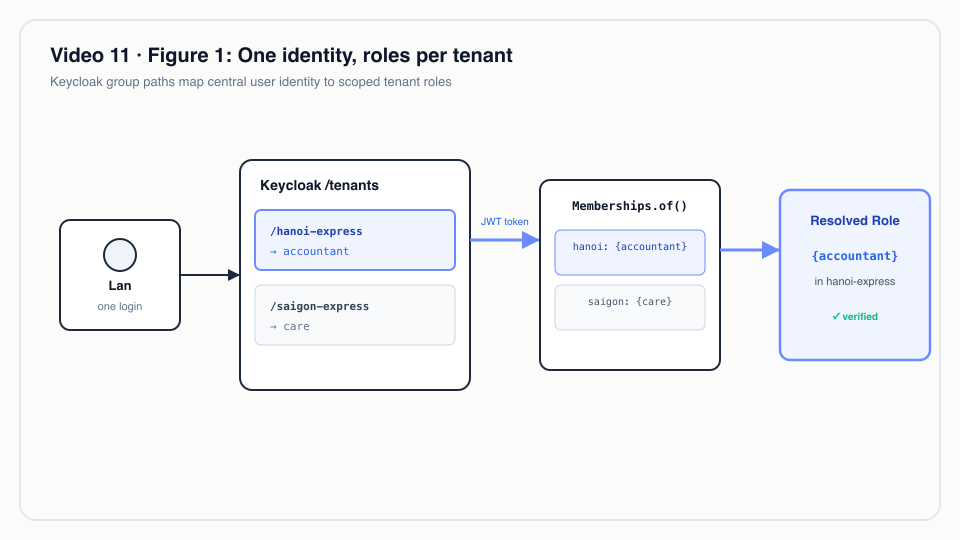 One identity, roles per tenant: Keycloak group paths map a single user identity to distinct roles across different tenants.
3. The tenant header selects; it does not grant
TenantResolverFilter resolves the tenant from the header, then a host subdomain, then the user's only
membership. Whatever it picks, the request continues only if the token holds at least one role in that tenant.
astra-kernel/src/main/java/io/astra/kernel/tenant/TenantResolverFilter.java
        Memberships memberships = Memberships.of(identity);
        String tenant = fromHeader(ctx).or(() -> fromHost(ctx)).or(() -> onlyMembership(memberships)).orElse(null);
        // …
        Set<String> roles = memberships.roles(tenant);
        if (roles.isEmpty()) {
            ctx.abortWith(error(Response.Status.FORBIDDEN, "not a member of tenant " + tenant));
            return;
        }
        tenantRequest.tenantId(tenant);
        tenantRequest.userId(identity.getPrincipal().getName());
        tenantRequest.roles(roles);
A client that sends X-Astra-Tenant: hanoi-express with a Saigon-only token gets 403 before any resource code
runs. Database row-level security (Video 7) is the second wall behind this one.
4. Permissions are data on the DocType
Each DocType lists rules per role. This is the order's table, which explains every refusal in the video:
astra-apps/express/src/main/resources/META-INF/astra/doctypes/customer-order.doctype.yaml
permissions:
  - { role: admin,      read: true, create: true, write: true, submit: true, cancel: true }
  - { role: sales,      read: true, create: true, write: true, if-owner: true, submit: true }
  - { role: ops,        read: true }
  - { role: care,       read: true }
  - { role: accountant, read: true, cancel: true }
if-owner restricts only write. That is why Tuan cannot save a colleague's order but can still submit it, a
behaviour the video shows on purpose rather than hides. The evaluator is a union over matching rules; no matching
rule means no access:
astra-doctype/src/main/java/io/astra/doctype/permission/DocPermissions.java
    private static boolean allows(DocTypeDefinition def, Set<String> roles, Action action, boolean owner) {
        for (PermissionRule rule : def.permissions()) {
            if (!roles.contains(rule.role())) continue;
            boolean granted = switch (action) {
                case READ -> rule.read();
                case CREATE -> rule.create();
                case WRITE -> rule.write() && (!rule.ifOwner() || owner);
                case SUBMIT -> rule.submit();
                case CANCEL -> rule.cancel();
            };
            if (granted) return true;
        }
        return false;
    }
The generated REST resource calls it before every operation (DocResource: require(…READ) for list and get,
requireWrite for update, requireSubmit for submit, require(…CANCEL) for cancel). Because apps do not write
their own controllers, an app cannot forget the check.
5. Desk asks, it does not decide
/api/iam/me returns, per tenant, the effective permissions computed by the same DocPermissions class:
astra-iam/src/main/java/io/astra/iam/IdentityResource.java
    private Map<String, Object> tenantView(String tenant, Set<String> roles) {
        Map<String, Object> m = new LinkedHashMap<>();
        m.put("tenant", tenant);
        m.put("roles", roles);
        m.put("permissions", permissions.effective(roles));
        return m;
    }
Desk draws buttons from that answer (desk.js, drawForm: Submit when perm.submit, Cancel when
perm.cancel). Hiding a button is a convenience; the 403 from the kernel is the control.
6. Segregation of duties is one flag
astra-apps/express/src/main/resources/META-INF/astra/doctypes/cod-remittance.doctype.yaml
submittable: true
segregation-of-duties: true        # maker/checker: whoever prepares a payout cannot approve it
# …
permissions:
  - { role: admin,      read: true, create: true, write: true, submit: true, cancel: true }
  - { role: accountant, read: true, create: true, write: true, submit: true, cancel: true }
astra-doctype/src/main/java/io/astra/doctype/permission/DocPermissions.java
    public void requireSubmit(String doctype, Set<String> roles, String userId, Document existing) {
        DocTypeDefinition def = registry.require(doctype);
        if (!allows(def, roles, Action.SUBMIT, false)) {
            throw new AccessDeniedException("submit " + doctype);
        }
        if (def.segregationOfDuties() && userId != null && userId.equals(existing.owner())) {
            throw new AccessDeniedException("submit " + doctype + "/" + existing.name()
                    + ": segregation of duties, the creator cannot submit their own document");
        }
    }
The comparison uses the token's subject (principal-claim: sub) against the document's owner, so renaming a
user in Keycloak does not let them approve their own old drafts. The effective-permission map does not model SoD,
so Desk still shows Submit to Khoa; the kernel answers 403, which is what the video shows.
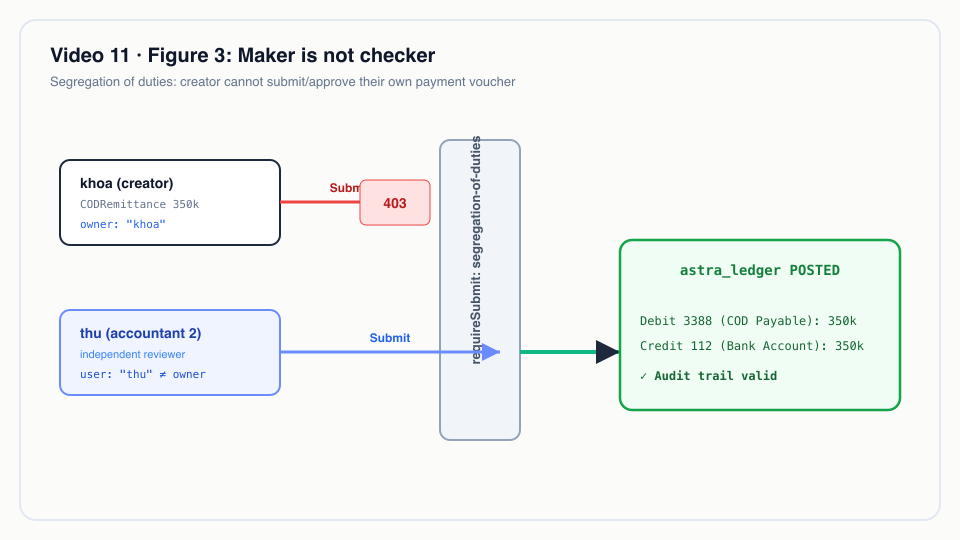 Segregation of duties: if-owner permissions ensure that the creator of a payment order cannot approve or submit their own voucher.
Real-world example
Illustrative scenario: the company, people and values are made up; the mechanism and the rules it applies are the real ones shown above.
A regional 3PL runs two franchise tenants on one Astra cluster. Lan is the chief accountant of hanoi-express and
also helps the Saigon customer-care desk on weekends.
Input (Keycloak): Lan is a member of /tenants/hanoi-express/accountant and /tenants/saigon-express/care.
What Astra does:
| Request | Resolved roles | Result |
|---|---|---|
GET /api/iam/me |
both tenants | hanoi-express: [accountant], saigon-express: [care], with per-DocType permissions for each |
POST /api/doc/CustomerOrder/<order>/cancel, X-Astra-Tenant: hanoi-express |
{accountant} |
allowed (accountant: cancel: true) |
Same call, X-Astra-Tenant: saigon-express |
{care} |
403, care has only read on orders |
POST /api/doc/SupportTicket, X-Astra-Tenant: saigon-express |
{care} |
201 |
Lan creates a 12,000,000 VND CODRemittance in Hanoi, then submits it |
{accountant} |
403, segregation of duties |
Her colleague Minh (also hanoi-express/accountant) submits it |
{accountant} |
200; the payout posts to the ledger (Video 12) |
Output: one login, two different jobs, no per-app user table, and an approval trail where the document's
owner and the submitter are provably different people. When Lan leaves the weekend shift, an administrator
removes one group membership in Keycloak; her next token no longer carries Saigon.
For technical leaders
- Where the truth lives. Identity and membership in Keycloak; what a role may do in Git, next to the DocType. Reviews of a permission change are code reviews.
- Fail-closed by default. No rule means no access; no role in the resolved tenant means 403 before resource
code. A new DocType without a
permissions:block is unreachable, not open. - Token lifetime is your revocation latency. Astra verifies JWTs offline. Removing a group takes effect at the next token refresh, not instantly. Size access-token lifetime to your risk; the realm uses 5 minutes for regular clients (see the Video 21 notes).
- Token size. Every membership is a string in
groups. A consultant in hundreds of tenants produces a large token; if that is your shape, plan for it. - What to measure. 403 rate per DocType and role (a spike after a deploy usually means a YAML regression), SoD refusals per month (evidence for auditors), and time from HR offboarding to group removal.
- When not to use this as is. If you need "sales may see only orders of their own branch" or amount limits ("submit up to 50 million"), that is row-level or attribute-based permission, which is not built yet. Today it has to be a hook that throws, which is code, not metadata.
- Compared with alternatives. Keycloak Authorization Services (policy enforcer) can centralise decisions but moves per-DocType rules out of the app's repository; Astra keeps them with the DocType. Frappe has the same DocType-level model but its own user store; Astra delegates users to an IdP.
Try it yourself
Prerequisites: JDK 25, Docker Desktop with 8 GB for the k3d stack, kubectl, k3d, jq, Bash 5.
make k3d-up                                  # cluster with Keycloak, realm synced by scripts/keycloak-sync-realm.sh
make demo-reset && make demo-seed            # tenants saigon-express and hanoi-express, demo users
make demo-express SCENES=9 PAUSE=0           # the scene used in this video
open http://localhost:8080/desk/             # sign in as tuan / Astra@123, then khoa, then thu
Expected in the terminal (scene 9 of scripts/demo-express.sh): /api/iam/me for tuan with CustomerOrder
and Waybill permissions; tuan creates and submits an order; his PUT /api/doc/Waybill/<waybill> and his
cancel are refused; quang updates the waybill to Picked Up and is refused when creating an order; ha creates
a SupportTicket; khoa cancels the order.
For the SoD scene, record right after demo-seed: as khoa, open CODR-…-0002 (350,000, created by khoa
during the seed) and press Submit (403), then sign in as thu and submit it.
Tests that pin this behaviour live in astra-server/src/test/java/io/astra/server/IamAccessTest.java and
LedgerTest.java; run them with make test. make demo-iam runs end-to-end IAM checks with real Keycloak
tokens.
Demo users share the password Astra@123 and are defined in deploy/keycloak/realm/astra-realm.json. They are for
local environments only.
To be accurate
- Row-level permission conditions (for example "only orders of my branch", or limits on amounts) are still on the
roadmap. Permissions today are per role and per DocType, plus
if-ownerfor writes and thesegregation-of-dutiesflag for submit. - SAML SSO and SCIM provisioning now run; they are shown in Video 21.
- Desk's effective-permission view does not model segregation of duties, so the Submit button can appear and the kernel then refuses with 403.
- Role changes reach Astra with the next token; an access token already issued keeps its roles until it expires.
Figures
- Figure 1 · One identity, roles per tenant
- Figure 2 · Same order, four roles
- Figure 3 · Maker is not checker
Related
- Previous: Video 10 · Running on Kubernetes. Next: Video 12 · Append-only ledger.
- Video 7 · Multi-tenancy (row-level security behind the tenant filter) and Video 21 · SAML SSO and SCIM (enterprise IdPs and provisioning into the same groups).
- Docs: demo-code-snippets.md, S5, iam-mobile-integration.md.
- Source:
astra-kernel/src/main/java/io/astra/kernel/security/Memberships.java,astra-kernel/src/main/java/io/astra/kernel/tenant/TenantResolverFilter.java,astra-doctype/src/main/java/io/astra/doctype/permission/DocPermissions.java,astra-doctype/src/main/java/io/astra/doctype/api/DocResource.java,astra-iam/src/main/java/io/astra/iam/IdentityResource.java,deploy/keycloak/realm/astra-realm.json,scripts/demo-express.sh(scene 9).