▶ English · Tiếng Việt · 2:24 · Script: demo-video-series.en.md
In one sentence: a tenant overlay is a small YAML file, stored per tenant under row-level security, that adds fields to an app's DocType or adjusts a safe subset of field properties, and takes effect at once for that tenant only, without forking or redeploying the app.
Read this if: you need to know exactly what an overlay can change, how the kernel merges it, and why some changes are refused / you run one product for many companies and want per-customer configuration without per-customer code branches.
The problem
Astra Express runs two tenants on the same Express app: saigon-express and hanoi-express. Hanoi has requirements
Saigon does not. Its B2B shippers ask for a VAT invoice on each order, it delivers to islands (Cát Bà, Cô Tô), and its
dispatchers want a delivery note on every order. Those requirements come straight from the comment at the top of the
real overlay file, tenants/hanoi-express/overlays/customer-order.overlay.yaml.
The usual options are all expensive:
- Fork the app for Hanoi. Every upstream fix must now be merged twice, and upgrades stall.
- Add every tenant's fields to the shared app, guarded by feature flags. The shared DocType grows fields most tenants never use, and Saigon users see or can submit fields that mean nothing to them.
- A generic "extra attributes" key-value table. Flexible, but the fields are invisible to validation, forms and APIs unless every layer special-cases them.
Frappe/ERPNext answered this with Custom Fields and Property Setters: per-site customisations that survive upgrades (explain.en.md). Astra borrows that idea and changes two things. The overlay is a per-tenant row in a shared database rather than per-site schema changes, and because business fields live in JSONB, adding a field runs no DDL.
What the video shows
The video is 2:24.
- The overlay file. Hanoi's YAML adds VAT invoice, tax code and invoice email fields, adds an
Islandzone, and makes the delivery note required. The tenant admin applies it through the overlay API; the file lives in Git. The Express app does not change a single line. - Two tenants, one form.
compare.htmlshows the same New Customer Order screen for both tenants. Hanoi's added and modified fields carry a✚ tenant overlayor✎ tenant overlaytag; Saigon is unchanged. - Validation is per tenant. Hanoi accepts an Island order with a VAT invoice. Saigon refuses the same body: unknown fields, invalid zone. Hanoi refuses an order without a note. Form, API and validation read one effective definition.
- Live edit in Desk.
mai, a Saigon admin, adds agift_wrapfield in the overlay editor and saves. It takes effect at once: no restart, no migration. Other pods pick up the change within two seconds. (The overlay is removed afterwards so later recordings show Saigon without an overlay.) - Guardrails. Changing a field type returns 422. A sales user (
tuan) editing the overlay gets 403. - For developers. Overlays are tenant data in their own table, under the same row-level security as documents.
- To be accurate. Overlays add fields and edit some properties. No hooks or permissions yet, no field removal.
How it works
The overlay format
tenants/hanoi-express/overlays/customer-order.overlay.yaml
# Hanoi Express only: B2B shippers ask for a VAT invoice on each order, deliveries reach islands
# (Cát Bà, Cô Tô), and dispatchers want delivery notes on every order. The Express app is untouched;
# applied with: PUT /api/overlay/CustomerOrder (tenant admin), see scripts/demo-seed.sh.
doctype: CustomerOrder
fields:
  add:
    - { name: vat_invoice,   type: Check, label: "Xuất hóa đơn VAT", in-list: true }
    - { name: tax_code,      type: Data,  label: "Mã số thuế" }
    - { name: invoice_email, type: Data,  label: "Email nhận hóa đơn" }
  modify:
    - { name: zone, options: [Same city, Domestic, Remote, Island] }
    - { name: note, label: "Ghi chú giao hàng", required: true }
Two verbs, add and modify. The base fields being modified are declared by the app:
astra-apps/express/src/main/resources/META-INF/astra/doctypes/customer-order.doctype.yaml
  - { name: zone,             type: Select,   options: [Same city, Domestic, Remote], default: Domestic, in-list: true, projected: true }
  # …
  - { name: note,             type: Text }
Merge rules: what an overlay may and may not do
All the rules live in one pure function.
astra-doctype/src/main/java/io/astra/doctype/registry/Overlays.java
public final class Overlays {

    private static final Set<String> MODIFIABLE = Set.of("name", "label", "required", "options", "default", "in-list");

    /** Returns the effective DocType; throws {@link IllegalArgumentException} with a readable reason for a bad overlay. */
    public static DocTypeDefinition apply(DocTypeDefinition base, String yaml) {
        // … parse YAML, check the doctype name matches
        List<FieldDefinition> fields = new ArrayList<>(base.fields());
        for (JsonNode m : root.path("fields").path("modify")) {
            String name = m.path("name").asText("");
            int i = indexOf(fields, name);
            if (i < 0) throw new IllegalArgumentException("cannot modify unknown field '" + name + "' of " + base.name());
            m.fieldNames().forEachRemaining(k -> {
                if (!MODIFIABLE.contains(k)) throw new IllegalArgumentException("field property '" + k + "' cannot be changed by an overlay");
            });
            FieldDefinition f = fields.get(i);
            fields.set(i, new FieldDefinition(f.name(), f.type(),
                    m.hasNonNull("label") ? m.get("label").asText() : f.label(),
                    m.has("required") ? m.get("required").asBoolean() : f.required(),
                    f.readOnly(),
                    // … in-list, projected, options, default, pii
        }
        for (JsonNode a : root.path("fields").path("add")) {
            // … parse the field definition
            if (indexOf(fields, f.name()) >= 0) throw new IllegalArgumentException("field '" + f.name() + "' already exists in " + base.name());
            if (f.projected() || f.readOnly()) {
                throw new IllegalArgumentException("overlay field '" + f.name() + "' cannot be projected or read-only");
            }
            fields.add(f);
        }
        return new DocTypeDefinition(base.name(), base.module(), base.kind(), base.submittable(), base.naming(),
                fields, base.permissions(), base.segregationOfDuties(), base.globalTransaction());
    }
Why each rule exists:
| Rule | Reason |
|---|---|
Only label, required, options, default, in-list can be modified |
These change what users see and must enter. They do not change what the app's Java code reads. |
type cannot change |
App hooks read fields with typed accessors (ShippingFeeHook reads weight_kg as a number). Retyping would break the app, and documents already stored with the old type. |
read-only, projected cannot be set |
read-only fields are reserved for hooks (for example shipping_fee). projected creates an expression index on the shared astra_doc table, which a tenant should not trigger. |
| No removal | Documents written before the overlay must stay valid, and the app may depend on every field it declared. |
permissions, submittable, naming, transaction: global copied from the base |
Security and lifecycle stay the app's decision. |
The class comment summarises it: an overlay "may not remove or retype fields, so documents written before the overlay stay valid and the app's own code keeps working".
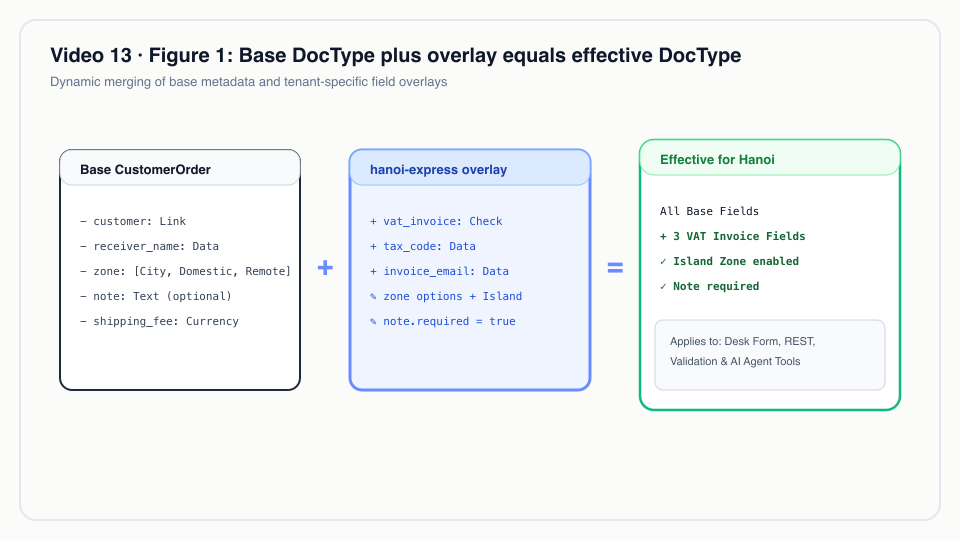 Base DocType plus overlay equals the tenant's effective DocType: custom fields merge seamlessly without touching app code.
Storage: tenant data under row-level security
astra-doctype/src/main/resources/db/migration/V4__overlays.sql
CREATE TABLE astra_overlay (
    tenant_id   text        NOT NULL,
    doctype     text        NOT NULL,
    yaml        text        NOT NULL,
    version     integer     NOT NULL DEFAULT 1,
    updated_by  text        NOT NULL,
    updated_at  timestamptz NOT NULL DEFAULT now(),
    PRIMARY KEY (tenant_id, doctype)
);

ALTER TABLE astra_overlay ENABLE ROW LEVEL SECURITY;
ALTER TABLE astra_overlay FORCE ROW LEVEL SECURITY;
CREATE POLICY astra_overlay_tenant_isolation ON astra_overlay
    USING      (tenant_id = current_setting('astra.tenant', true))
    WITH CHECK (tenant_id = current_setting('astra.tenant', true));
Why a table and not files on disk: overlays are tenant configuration, so they get the same isolation as tenant
documents (Video 7). A query in Hanoi's scope cannot see Saigon's overlay even if the code forgot a WHERE clause.
The primary key allows one overlay per tenant and DocType; every save increments version and records updated_by.
The YAML file under tenants/ is the Git copy; the seed script applies it through the API
(scripts/demo-seed.sh).
The effective DocType, cached for two seconds
Every place in the kernel that needs a DocType asks for "the DocType as this tenant sees it":
astra-doctype/src/main/java/io/astra/doctype/registry/DocTypeOverlays.java
    static final long TTL_MILLIS = 2_000;

    /** The effective DocType for the tenant in scope, or the app's definition outside a tenant scope. */
    public DocTypeDefinition effective(String doctype) {
        DocTypeDefinition base = registry.require(doctype);
        Optional<String> tenant = TenantContext.current();
        if (tenant.isEmpty()) return base;
        String key = tenant.get() + "|" + doctype;
        Cached c = cache.get(key);
        if (c != null && System.currentTimeMillis() - c.loadedAt() < TTL_MILLIS) return c.def();
        DocTypeDefinition def = base;
        Optional<Map<String, Object>> overlay = get(doctype);
        if (overlay.isPresent()) {
            try {
                def = Overlays.apply(base, (String) overlay.get().get("yaml"));
            } catch (IllegalArgumentException e) {
                // Stored overlays are validated on write; one that no longer fits a newer app version is skipped.
                LOG.warnf("Overlay of %s for tenant %s ignored: %s", doctype, tenant.get(), e.getMessage());
            }
        }
        cache.put(key, new Cached(def, System.currentTimeMillis()));
        return def;
    }
DocumentStore calls overlays.effective(doctype) for list, insert, update and validation
(astra-doctype/src/main/java/io/astra/doctype/store/DocumentStore.java), and GET /api/doctype serves the same
result to Desk and API clients. That single call site is why form, list, REST and validation cannot disagree.
Why a 2-second TTL: the pod that handles the PUT evicts its own cache entry immediately, so the editor sees the
change at once. Other pods have no invalidation channel; they re-read within TTL_MILLIS. That trades a bounded
delay for having no message bus in the kernel.
Why "skip with a warning" on read: an overlay was valid when saved, but a later app version might remove or rename a field it modifies. The kernel then serves the app's base definition and logs a warning instead of failing every request for that tenant.

View source
sequenceDiagram
autonumber
actor A as mai (admin, saigon-express)
participant R as OverlayResource
participant O as DocTypeOverlays
participant PG as astra_overlay (RLS)
participant P2 as other kernel pod
A->>R: PUT /api/overlay/CustomerOrder (application/yaml)
R->>R: requireAdmin → 403 for non-admin
R->>O: put(doctype, yaml, user)
O->>O: Overlays.apply(base, yaml) → 422 if unsafe
O->>PG: INSERT … ON CONFLICT DO UPDATE version + 1
O->>O: evict local cache (tenant|doctype)
R-->>A: 200 {version, added, modified}
Note over P2: cache entry expires within 2 s,<br/>next request re-reads and re-applies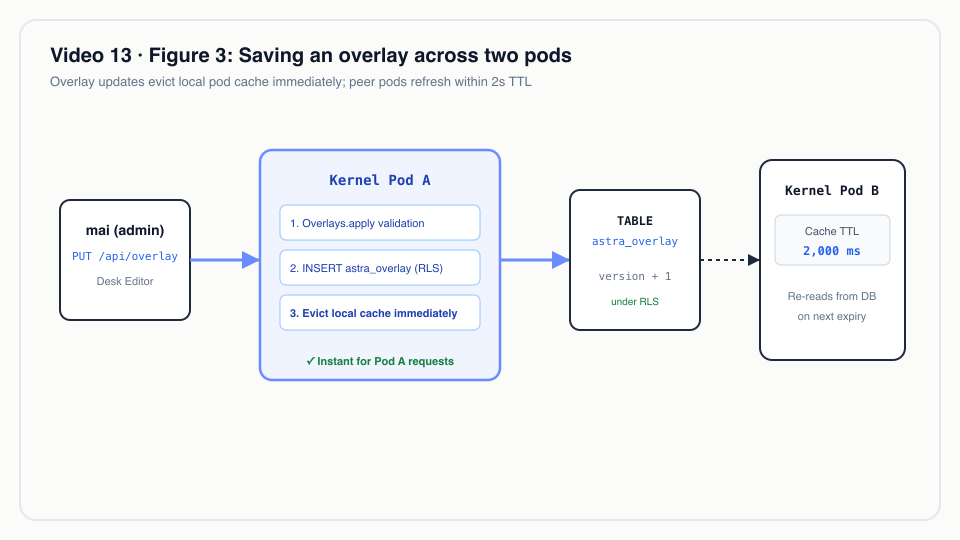 Saving an overlay across two pods: the 2-second cache TTL guarantees near-instant propagation without cluster cache sync overhead.
Who may change an overlay
astra-doctype/src/main/java/io/astra/doctype/api/OverlayResource.java
/**
 * Per-tenant DocType overlays. Every member may read them (they shape the forms they use); only the
 * tenant's {@code admin} role may change them. Bodies are YAML ({@code application/yaml} or text).
 */
@Path("/api/overlay")
// …
    @PUT
    @Path("/{doctype}")
    @Consumes({"application/yaml", "text/yaml", MediaType.TEXT_PLAIN})
    public Map<String, Object> put(@PathParam("doctype") String doctype, String yaml) {
        requireAdmin("change the overlay of " + doctype);
        return scoped(() -> overlays.put(doctype, yaml, tenant.userId()));
    }
The role check reads roles from the Keycloak token for the current tenant (Video 11), so admin in Hanoi grants
nothing in Saigon.
Real-world example
Illustrative scenario: the company, people and values are made up; the mechanism and the rules it applies are the real ones shown above.
A regional courier in northern Vietnam serves B2B shippers in Hanoi and delivers to Hạ Long Bay islands. Finance needs a tax code on any order that requires a VAT invoice; dispatch needs a note on every order. The courier licenses the same Express app as a southern operator that has none of these rules.
The behaviour below is what astra-server/src/test/java/io/astra/server/OverlayTest.java and scene 11 of
scripts/demo-express.sh assert.
| Request | Tenant | Result |
|---|---|---|
PUT /api/overlay/CustomerOrder with the Hanoi YAML, as admin |
hanoi | 200, version: 1 |
GET /api/doctype/CustomerOrder |
hanoi | fields include tax_code; zone options include Island; note.required = true |
| same | saigon | no tax_code; original options |
order with zone: Island, vat_invoice: true, tax_code: 0100109106, note: Giao trước 10h |
hanoi | 201 |
| same body | saigon | 422: unknown field 'tax_code' for DocType CustomerOrder, and the zone is not one of the allowed options |
order without note |
hanoi | 422: field 'note' is required |
overlay modifying weight_kg to type: Data |
hanoi | 422: field property 'type' cannot be changed by an overlay |
overlay adding gift_wrap, as tuan (sales) |
saigon | 403 |
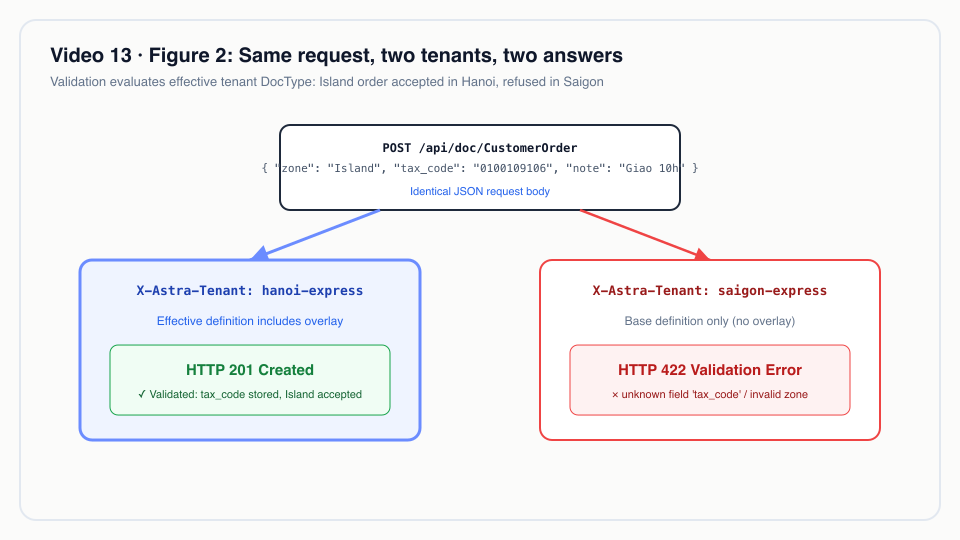 Same request, two tenants, two answers: Saigon processes standard orders, while Hanoi enforces VAT and island shipping fields.
What the regional courier gets: no fork, no schema change, and its rules are enforced on every channel (Desk, REST, MCP), because all three validate against the effective definition.
One thing the overlay alone does not do: price island deliveries differently. The standard tariff in
ShippingFeeHook has no Island entry and falls back to the Domestic rate
(TARIFF.getOrDefault(zone, TARIFF.get("Domestic"))). A tenant that needs an island price uses a Tier 2 pricing rule,
whose ABI already maps Island to zone 3; see Video 14.
For technical leaders
- Customisation without divergence. Each tenant's difference is a few lines of YAML, versioned in a table and in Git, not a branch. Upgrading the app upgrades every tenant.
- Bounded power by design. Overlays can add fields and change presentation and mandatory-ness. They cannot change types, security, lifecycle or indexing. This keeps the blast radius of a tenant admin's mistake to that tenant's forms and validation.
- Consistency window. A change is immediate on the pod that saved it and visible on other pods within 2 seconds. For configuration that is acceptable; do not use overlays for anything that needs cluster-wide atomic switch-over.
- Upgrade risk. If an app release removes or renames a field an overlay modifies, the kernel silently falls back
to the base definition for that tenant and logs
Overlay of … ignored. Monitor that log line after every app deploy; there is no automated pre-rollout conformance check yet. - Operational cost. One extra cached lookup per DocType per tenant per 2 seconds per pod. No DDL, no deploys.
- When not to use overlays. When a tenant needs different behaviour (hooks, workflow, permissions), not just different fields; that is not supported yet. When a field should be indexed for filtering at scale; overlay fields cannot be projected.
- What to measure. Number of tenants with overlays, fields added per overlay, 422 rate per tenant after an overlay change, and occurrences of the "ignored" warning.
Try it yourself
Prerequisites: the k3d stack from the recording environment
(make k3d-up), then a fresh seed. The seed applies Hanoi's overlay through the API.
make demo-reset && make demo-seed
make demo-express SCENES=11            # add PAUSE=0 to run without pressing Enter
Expected: scene 11 prints the overlay file, then GET /api/doctype/CustomerOrder for both tenants (Hanoi shows
vat_invoice, tax_code, invoice_email, Island and a required note; Saigon does not), a 201 for the Island VAT
order in hanoi-express, a 422 for the same body in saigon-express, a 422 for the order without a note, a 422 for the
type change and a 403 for tuan.
In the browser:
- Log in as
demo/Astra@123athttp://localhost:8080/desk/, then openhttp://localhost:8080/desk/compare.htmland go to#/new/CustomerOrder. - Log in as
mai, open DocType metadata → CustomerOrder → Tenant overlay, add- { name: gift_wrap, type: Check }underfields: add:, and click Save overlay. Click Remove overlay when you are done.
Run the overlay tests alone (Docker required) with Maven's standard test filter, for example
./mvnw -pl astra-server -am test -Dtest=OverlayTest -Dsurefire.failIfNoSpecifiedTests=false.
To be accurate
- Overlays add fields and modify
label,required,options,defaultandin-list. They do not add hooks or permissions yet, and they cannot remove an app's fields. - Overlay fields cannot be
projectedorread-only. - Other pods see a change within 2 seconds, not instantly.
- An overlay that no longer fits a newer app version is skipped with a log warning; there is no conformance check before rollout yet.
- overlay-wasm.md describes a broader target design (
add-permissions, Wasmscriptsattached to an overlay, an upgrade conformance check). Those parts are not built.
Figures
- Figure 1 · Base DocType plus overlay equals the tenant's effective DocType
- Figure 2 · Same request, two tenants, two answers
- Figure 3 · Saving an overlay across two pods
Related
- Previous: Video 12 · Append-only ledger · Next: Video 14 · Tier 2 Wasm
- Video 2 · DocType, Video 7 · Multi-tenancy, Video 9 · Writing an Astra app, Video 11 · Keycloak
- Code excerpts: S7 Tenant overlays
- Background (target design, partly built): overlay-wasm.md, explain.en.md
- Source:
astra-doctype/src/main/java/io/astra/doctype/registry/Overlays.java,astra-doctype/src/main/java/io/astra/doctype/registry/DocTypeOverlays.java,astra-doctype/src/main/java/io/astra/doctype/api/OverlayResource.java,astra-doctype/src/main/resources/db/migration/V4__overlays.sql,tenants/hanoi-express/overlays/customer-order.overlay.yaml,astra-server/src/test/java/io/astra/server/OverlayTest.java